POS
A custom Point of Sale (POS) application built for a gold retail store in Saudi Arabia, designed to deliver a fast, simple, and seamless in-store sales experience.
The system enables store owners and staff to present products on a tablet, create orders instantly, and complete payments using cash or NearPay, all from a single, intuitive interface. With a strong focus on usability and speed, the POS ensures accurate pricing, smooth order tracking, and a frictionless checkout flow.
"4th project together, with solid technical understanding, strong execution, clean architecture, and a clear focus on real usability."


The Problem
The store was relying on Odoo’s standard interface, which was not optimized for fast in-store sales or tablet-based usage. The complexity of the UI made daily operations slower and harder for staff, especially during busy hours.
In addition, the lack of native NearPay payment support created friction at checkout, forcing manual workarounds and increasing the risk of errors. This resulted in slower transactions, inconsistent payment handling, and a suboptimal customer experience at the point of sale.
The Solution
A dedicated, tablet-first POS application designed specifically for gold retail operations. The system replaces complex back-office workflows with a clean, intuitive interface optimized for speed, touch interaction, and non-technical staff.
The POS enables instant product presentation, fast order creation, and seamless checkout with cash and NearPay payments, all within a single flow. By focusing on usability, accurate pricing, and real-time order tracking, the solution delivers a smooth in-store experience while staying fully aligned with the business requirements of the Saudi market.


Unified POS Home
Everything needed to start a sale, instantly
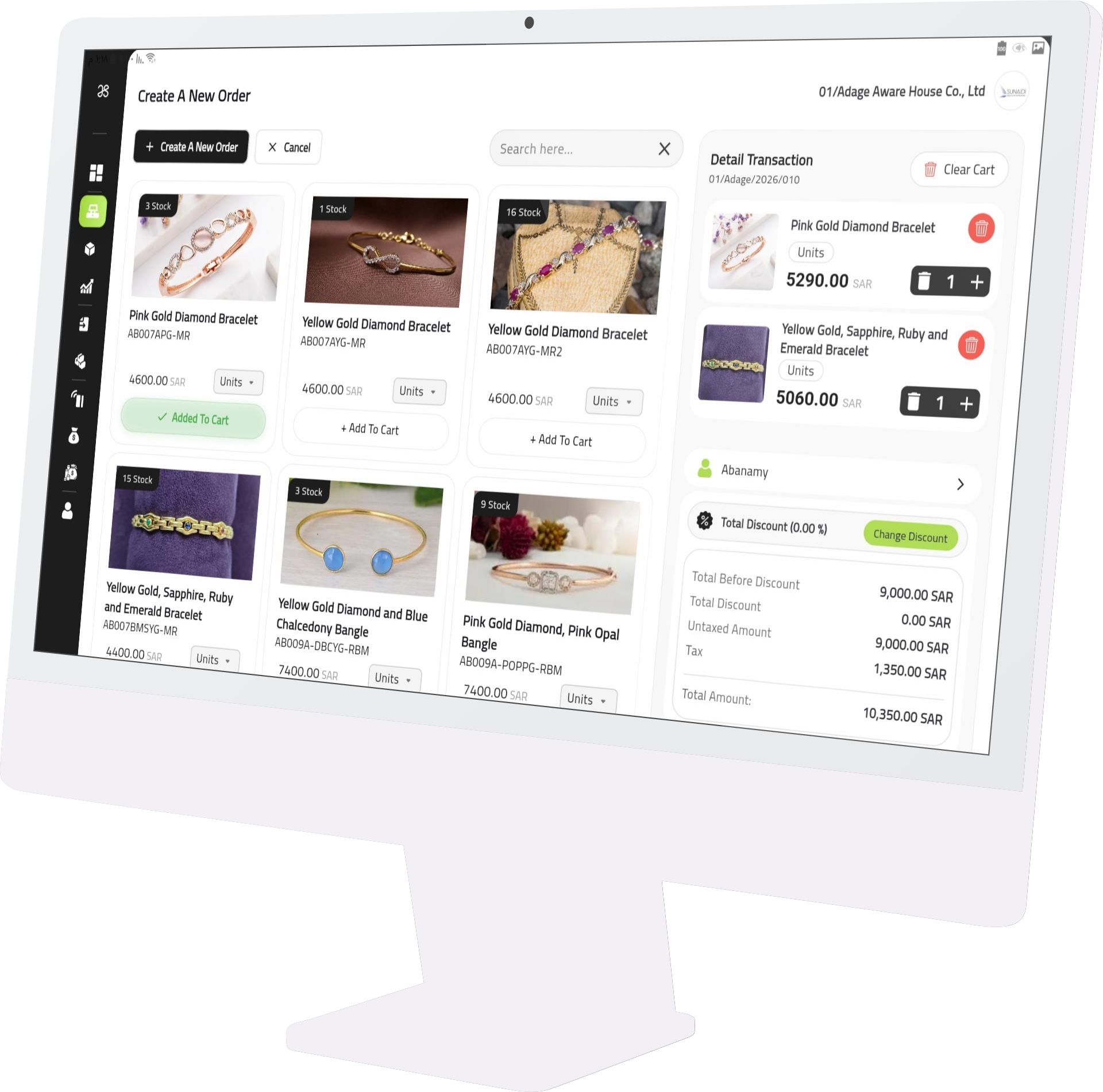
The home screen serves as the central workspace for all in-store sales activities. It presents the full product catalog in a clean, tablet-friendly layout, allowing staff to browse, search, and add items to the cart quickly.
Designed for speed and simplicity, the interface minimizes steps and distractions, enabling fast order creation and a smooth checkout flow. From product selection to payment, every action starts from this screen, ensuring an efficient and intuitive point-of-sale experience.
Flexible Pricing Control
Adjust prices, discounts, and taxes with confidence
For each product, staff can manually adjust the price or apply custom discounts based on the customer and sales scenario. This flexibility allows personalized pricing without slowing down the checkout process.
The system also provides full control over tax application, enabling taxes to be added or excluded per item when needed. All pricing changes are reflected instantly in the order summary, ensuring accuracy, transparency, and a smooth checkout experience.


Order Review & Control
Review, adjust, and finalize with confidence
After adding items, staff can review the full order, adjust quantities, inspect pricing details, select the customer, and apply order-level discounts. The interface keeps all changes visible and easy to manage in one place.
Orders can be saved, updated, or cleared to start a new transaction, ensuring flexibility and a smooth workflow during busy in-store operations.
Flexible Payment Splitting
Combine multiple payment methods seamlessly
The POS allows payments to be split across multiple methods within the same order. Staff can combine NearPay, cash, or other payment types and adjust amounts as needed.
Each payment entry is tracked clearly, showing remaining balances in real time and ensuring accurate, transparent settlement before order confirmation.


Orders History
Track and review all transactions with clarity
The POS provides a complete overview of all orders, allowing staff to review past transactions, check payment statuses, and track amounts due or fully settled orders.
Clear status indicators and filters make it easy to follow up on sales, ensuring full visibility and accurate record-keeping across all completed and pending orders.
Order Details
Full visibility into every transaction
Each order displays a complete breakdown of products, quantities, pricing, discounts, taxes, and payment status. This ensures clear visibility and accurate verification at any time.
The detailed view allows staff to quickly review transaction information and print order details when needed, supporting reliable record-keeping and customer transparency.


Sold Items Overview
Detailed insights into completed sales
The POS provides a structured view of all sold items, including product details, quantities, weights, pricing, and related sale references. This allows clear tracking of what has been sold and at what value.
By organizing sold items in a single view, the system supports accurate reporting, auditing, and easy review of sales performance over time.
Import Receipts
Track incoming stock with accuracy
Write one or two paragraphs describing your product or services. To be successful your content needs to be useful to your readers.
By centralizing import records in one place, the system ensures better stock visibility, reliable reconciliation, and structured inventory management.


Import Receipt Details
Full visibility into incoming stock
Each import receipt displays a detailed breakdown of items, including quantities, weights, individual values, and total amounts. This ensures accurate tracking of imported stock at item level.
The summarized metrics at the top provide a quick overview, supporting reliable inventory control and easier verification during stock reconciliation.
Re-Export Report
Track re-exported items with precision
The system provides a structured report for all re-exported items, displaying product details, weights, quantities, and associated values. This ensures accurate tracking of items moved out of inventory.
By consolidating re-export data in a clear report, the POS supports compliance, auditing, and better inventory reconciliation for gold retail operations.


NearPay Transactions
Clear visibility into digital payments
The POS provides a dedicated view for all NearPay transactions, displaying payment amounts, dates, and transaction types such as purchases and refunds.
This centralized view makes it easy to review digital payments, track refunds, and maintain accurate financial records for daily operations.
Reconciliations
Ensure accurate financial alignment
The reconciliation view provides a clear comparison between recorded transactions and actual payment totals, highlighting balanced and unbalanced amounts.
This helps store owners quickly identify discrepancies, verify daily totals, and maintain accurate financial records with confidence.


Profile Access Control
Secure access to settings and device actions
Access to the profile and system settings is protected by a passcode configured in Odoo, ensuring controlled access to sensitive actions.
This allows store owners to manage who can update settings, view profile details, or log out from the device, adding an extra layer of security to daily operations.
Business Overview Dashboard
Key metrics at a glance
The dashboard provides a high-level overview of key business metrics, including total sales, costs, stock value, imports, and payment breakdowns. All information is presented in a clean, easy-to-read layout.
This view helps store owners quickly understand daily performance and make informed decisions without navigating through detailed reports.

Contact Me
I'd love to hear from you! If you have any questions, feedback, or need assistance, please feel free to reach out to me using the contact details provided. I'm here to help and will respond as soon as possible. Thank you for getting in touch!